Can you play Netflix Boggle on your phone without a TV?
See how phones work with Netflix Boggle Party, when a computer can replace the TV, and which options let you play a word-grid game on your phone alone.
The short answer
You can use your phone to play Netflix's Boggle Party, but Netflix currently lists TV and computer browsers as its game platforms. The phone acts as a controller. If you want to play with only your phone, choose a separate mobile word game.
This guide separates three situations: joining a TV game, playing without a TV but with a computer, and finding a word-grid game that runs on your phone by itself.
We make GridzyPals, one independent phone-friendly alternative discussed below. We are not affiliated with Netflix or Hasbro.
Which setup do you have?
| Your setup | The practical option | What to check |
|---|---|---|
| TV and phone | Launch Boggle Party on a supported TV; join with your phone. | Netflix game availability on that TV and in your country. |
| Computer and phone | Check Boggle Party through Netflix.com on a computer. | Supported browser and the game's controller instructions. |
| Only a phone | Choose a standalone mobile word-grid game, such as GridzyPals. | App or browser access, scoring, account requirements and cost. |
| Friends playing at different times | Look for asynchronous challenges, such as GridzyPals VS. | The round can be timed even when players take turns separately. |
Netflix's official Boggle Party support page lists one to eight players, TV and computer browsers, and no offline play. Those platform details are the basis for the phone-only answer above.
Use your phone with Netflix Boggle Party
On a supported TV, open Netflix, choose a profile, find Boggle Party under Games and select Play Game. Scan the on-screen QR code with each player's phone and follow the connection prompts. Netflix's TV and computer setup guide has the current device checks.
The phone interaction is real gameplay: you swipe words on the mobile device while the TV presents the shared scores. Netflix describes that arrangement in its party games guide. It explains why the game can feel like a phone app even though the session starts on another screen.
Before inviting a room full of people, connect one phone and finish a round. That simple rehearsal tells you whether this particular TV and connection are ready for your game night.
No TV: what if you have a computer?
A computer is another documented host. Open Netflix.com in Chrome or Edge, choose your profile and look for Games. Start Boggle Party if available, then follow its controller prompts. This removes the need for a TV; it does not establish support for launching the game entirely in a phone browser.
If Games is missing, check your country, device and browser against Netflix's compatibility guidance. Supported access can change. Seeing downloadable mobile games does not necessarily mean that the TV/computer games are available on that device.
Only your phone: choose the experience you miss
Start by deciding what made the Netflix game fun. Was it racing the timer, swiping through a letter grid, seeing everybody's scores or finding a word your friends missed? A replacement that matches your favorite part is more useful than one with the closest name.
- A quick solo break: choose repeatable timed rounds. You should be able to start when you have a minute, without organizing a group.
- Friends ready together: choose live multiplayer. Check the player limit and whether everyone can join from their device.
- The rivalry, but different schedules: choose asynchronous challenges. Each person completes a turn when available.
- A daily routine: choose a recurring board with results you can compare. You do not need a live room to have a shared score to chase.
If you specifically want an official Boggle app for iPhone, our iPhone Boggle comparison covers Boggle With Friends and Boggle: Arcade Edition alongside GridzyPals.
Try GridzyPals without a TV
GridzyPals runs as an iPhone/iPad app and in mobile or desktop browsers. You find words by connecting neighboring letters before the timer ends. No Netflix membership or shared TV is required.
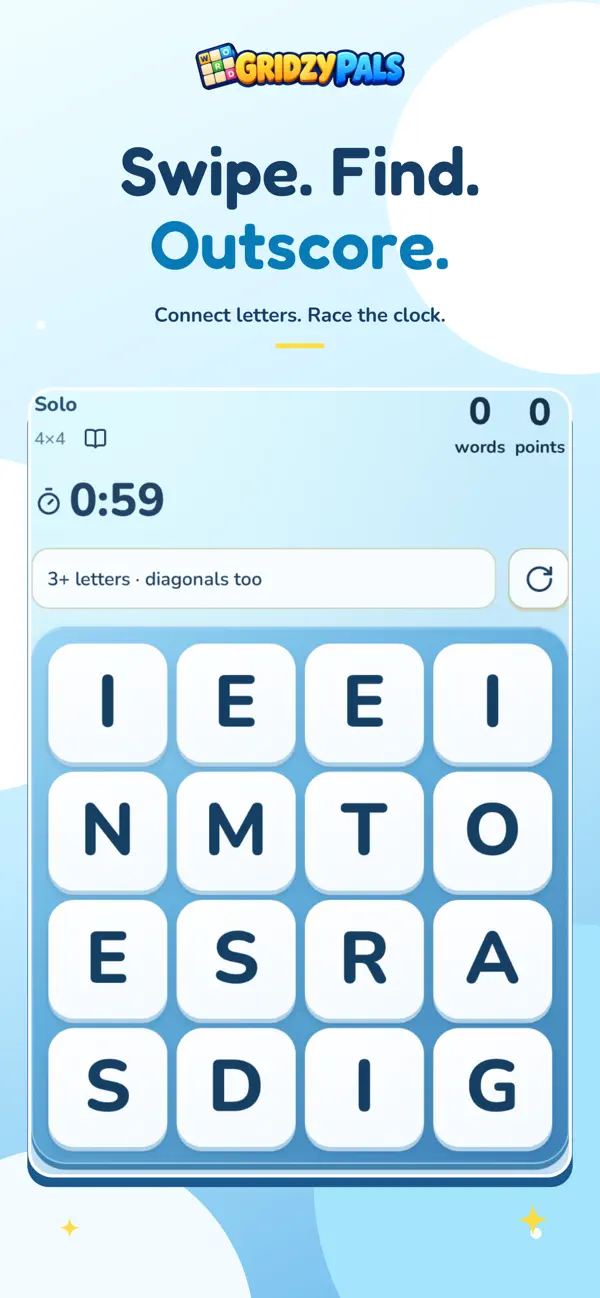
Use Solo for practice, Party for live games with two to eight players, or VS for challenges you finish separately. Daily offers three boards with Pals and Worldwide rankings. You can choose 4×4, 5×5 or 6×6 grids and configure rounds from 30 seconds to three minutes.
Our live multiplayer scoring has its own twist: words found only by you earn double points, while shared words keep their regular points. Optional cosmetics do not change scoring. Read the rules before comparing results with another game.
To start, download the app or open the browser game, create a free account and try a short Solo round. Then invite a friend to a private Party, or send a VS challenge. Public lobbies depend on other players being available.
Get GridzyPals for iPhone or iPad ↗
Try the short homepage sample
GridzyPals is free with optional purchases. The full game requires a free account and internet; word gameplay is in English. The current App Store listing describes the available modes and device requirements.
Common questions
Is there a Netflix Boggle app I can download and play by itself?
The official Boggle Party support page currently lists TV and computer browsers. Using a phone as its controller is different from having a standalone phone edition.
Can I play Netflix Boggle alone?
Yes, Netflix lists solo support. A one-player session still uses a supported TV or computer setup; solo does not mean phone-only.
Does Boggle Party cost extra?
Netflix says its games are included with membership, without ads or in-app purchases. A compatible device and available service are still required. Check Netflix's current terms for your location.
Can I keep playing when friends leave?
For a live session, plan around everyone being available. If you want a rivalry that continues across different schedules, GridzyPals VS lets you send a timed challenge for a friend to complete later.
Will another app use the same words and scoring?
Do not assume so. Dictionaries, timers and scoring vary. Compare the rules and the experience instead of expecting scores or progress to transfer between unrelated games.
Boggle is a trademark of Hasbro. GridzyPals is independent and is not affiliated with or endorsed by Hasbro, Zynga or Netflix. Product information may change. Competitor features were checked against linked official sources; this guide does not claim hands-on testing.
A little practice.
A little friendly rivalry.
iPhone, iPad & browser. Free with optional purchases. A free account and internet connection are required.